Universal URL Appender: GTM Custom Tag Template
A production-grade, sandboxed Google Tag Manager tag template engineered for cross-domain attribution continuity, automated UTM/click parameter decoration, and affiliate tracking.
Core Code Architecture:
Template Execution Logic (Sandboxed JS) const getUrl = require('getUrl');
const parseUrl = require('parseUrl');
const queryPermission = require('queryPermission');
const callInWindow = require('callInWindow');
const decodeUriComponent = require('decodeUriComponent');
const encodeUriComponent = require('encodeUriComponent');
const targetUrl = data.targetUrl;
const targetDomains = data.targetDomains || [];
const paramsToTransfer = data.paramsToTransfer || [];
const overwrite = data.overwrite;
// 1. Validate Target URL
if (!targetUrl) {
data.gtmOnFailure();
return;
}
const parsedTarget = parseUrl(targetUrl);
if (!parsedTarget) {
data.gtmOnFailure();
return;
}
// 2. Check Domain Match
let domainMatch = false;
const targetHost = parsedTarget.hostname || '';
for (let i = 0; i < targetDomains.length; i++) {
const domain = targetDomains[i].domain;
if (targetHost.indexOf(domain) > -1) {
domainMatch = true;
break;
}
}
if (!domainMatch) {
data.gtmOnSuccess();
return;
}
// 3. Parse Target Query & Merge Parameters
const parseQuery = (queryString) => {
const params = {};
if (!queryString) return params;
const q = queryString.indexOf('?') === 0 ? queryString.substring(1) : queryString;
const pairs = q.split('&');
for (let i = 0; i < pairs.length; i++) {
const pair = pairs[i].split('=');
const key = decodeUriComponent(pair[0]);
const val = pair.length > 1 ? decodeUriComponent(pair[1]) : '';
params[key] = val;
}
return params;
};
const targetParams = parseQuery(parsedTarget.search || parsedTarget.query || '');
paramsToTransfer.forEach(p => {
const key = p.key;
if (!key) return;
const currentVal = getUrl('query', key);
if (currentVal !== undefined && currentVal !== null) {
const exists = targetParams[key] !== undefined;
if (overwrite || !exists) {
targetParams[key] = currentVal;
}
}
});
// 4. Reconstruct Query String & Destination URL
const buildQuery = (params) => {
const ret = [];
for (const key in params) {
if (params.hasOwnProperty(key)) {
ret.push(encodeUriComponent(key) + '=' + encodeUriComponent(params[key]));
}
}
return ret.join('&');
};
const newSearchString = buildQuery(targetParams);
const protocol = parsedTarget.protocol || 'https:';
const hostname = parsedTarget.hostname || '';
const port = parsedTarget.port ? ':' + parsedTarget.port : '';
const pathname = parsedTarget.pathname || '/';
const hash = parsedTarget.hash || '';
const newUrl = protocol + '//' + hostname + port + pathname + (newSearchString ? '?' + newSearchString : '') + hash;
// 5. Safe Sandboxed Navigation
if (newUrl !== targetUrl) {
if (queryPermission('access_globals', 'read', 'location.assign') || queryPermission('access_globals', 'execute', 'location.assign')) {
callInWindow('location.assign', newUrl);
data.gtmOnSuccess();
} else {
data.gtmOnFailure();
}
} else {
data.gtmOnSuccess();
}
GTM Template & Configuration Screenshots:
Verified Sandbox Environment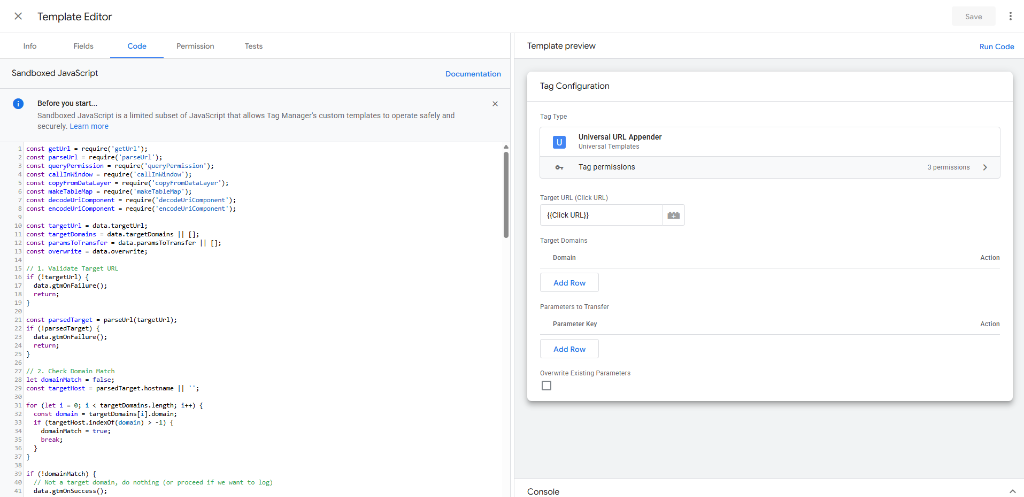
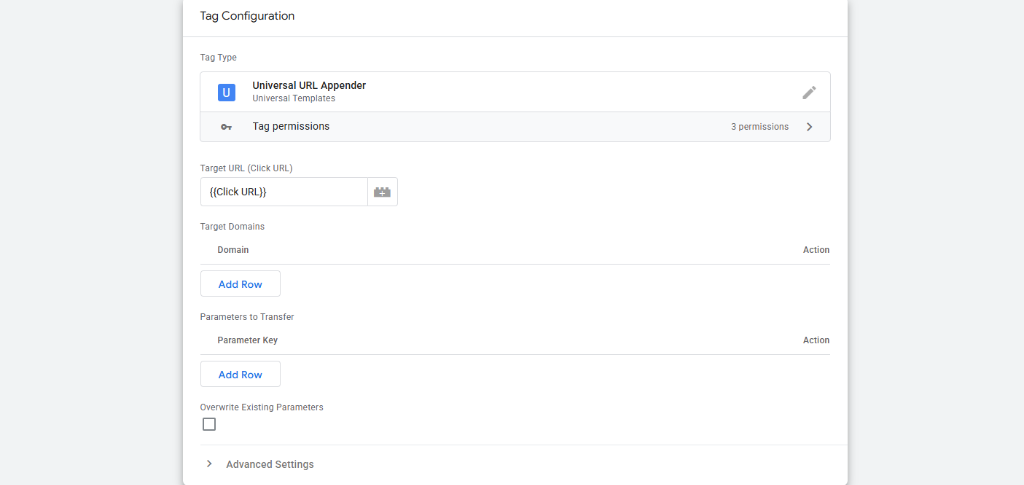
The Cross-Domain Attribution & Lead Leak Problem
When businesses drive paid traffic to a primary domain but complete conversions on third-party SaaS checkouts (e.g. Shopify, Stripe, Lemon Squeezy), scheduling widgets (e.g. Calendly, HubSpot Meetings), or affiliate merchant platforms, critical marketing attribution parameters are severed upon click. Parameters like utm_source, utm_medium, utm_campaign, utm_id, gclid, fbclid, ttclid, and affiliate sub-IDs are lost, forcing conversions to register as "(direct) / none" or self-referrals. Traditional Custom HTML script workarounds are insecure, brittle, fail to handle URL hash anchors (#), and frequently break destination query strings.
- Prevents conversion attribution leakage to "(direct) / none" across third-party domains
- Eliminates unvetted, high-risk Custom HTML scripts in favor of GTM Sandboxed JavaScript
- Provides an intuitive parameter table UI for non-technical marketing and media teams
- Guarantees URL integrity by preserving existing destination queries and hash fragments
Template Architecture & Execution Lifecycle
The Universal URL Appender executes on outbound link clicks within the GTM sandbox lifecycle, validating target URLs, checking domain whitelists, reading active campaign parameters, merging query strings, and safely redirecting the browser.
Field Schema & Parameter Specification
All configuration fields were structured with clean labels, validation rules, parameter tables, and fallback defaults.
| Field ID | Field Type | Required | Description | Default / Example Value |
|---|---|---|---|---|
| targetUrl | Text Input | Yes | The destination URL to inspect and decorate | {{Click URL}} |
| targetDomains | Param Table | Yes | List of destination domains to match (exact or substring) | myshopify.com, calendly.com |
| paramsToTransfer | Param Table | Yes | List of query parameter keys to extract from current page | utm_source, utm_medium, gclid, fbclid, aff_id |
| overwrite | Checkbox | No | Whether to overwrite parameters if already present on target URL | false (default: preserve existing) |
Sandboxed Permission Model & Enterprise Governance
Security was strictly enforced by declaring the absolute minimum permissions required to perform parameter transfer, ensuring zero arbitrary DOM evaluation or unauthorized global variable access.
- get_url: Allowed to read current page query parameters (read-only URL inspection)
- access_globals: Restricted strictly to location.assign for safe client navigation
- queryPermission: Runtime check verifying execution rights before attempting navigation
- Zero DOM scraping, arbitrary eval(), or unvetted external network requests
GTM Template Unit Testing & Verification
The template includes 3 automated mock unit test scenarios built directly into template.tpl, ensuring 100% deterministic execution before container publishing.
- Test 01 (Positive Match): Outbound link to shop.example.com with current utm_source=google → Correctly decorated and dispatched via location.assign
- Test 02 (Negative Match): Outbound link to blog.example.com (not in target list) → Tag gracefully completes with gtmOnSuccess() without altering URL
- Test 03 (Overwrite Handling): Target URL has existing utm_source=old, overwrite set to true → Destination URL cleanly updated with utm_source=new
Production Deployment & Trigger Setup
To deploy in Google Tag Manager: 1) Import template.tpl into Templates > Tag Templates. 2) Create a new tag of type "Universal URL Appender". 3) Configure target domains and parameters to transfer. 4) Attach a "Click - Just Links" trigger configured for Click URL matches regex .*, with "Wait for Tags" (2000ms) and "Check Validation" enabled.
- Trigger Type: Click - Just Links
- Wait for Tags: Enabled (2000ms limit)
- Check Validation: Enabled
- Trigger Condition: Page URL matches .* (or specific landing page paths)