LocalStorage User Path Helper: GTM Custom Template
A production-grade, sandboxed Google Tag Manager tag & variable template engineered for client-side navigation tracking, dwell-time telemetry, and pre-conversion journey attribution.
Core Code Architecture:
LS Helper Execution Logic (Sandboxed JS) const localStorage = require('localStorage');
const JSON = require('JSON');
const getTimestamp = require('getTimestampMillis');
const copyFromDataLayer = require('copyFromDataLayer');
const getUrl = require('getUrl');
const makeInteger = require('makeInteger');
const key = data.storageKey || 'gtm_user_path_history';
const op = data.operation;
if (op === 'clear') {
localStorage.remove(key);
data.gtmOnSuccess();
return;
}
// 1. Helper to retrieve current history
const getHistory = () => {
const stored = localStorage.getItem(key);
if (!stored) return [];
const parsed = JSON.parse(stored);
if (parsed && (parsed.length !== undefined)) {
return parsed;
}
return [];
};
// 2. GET Operation (Variable Mode)
if (op === 'get') {
const history = getHistory();
if (data.outputFormat === 'flattened') {
const flattened = {};
const slice = history.slice(-5); // Extract last 5 steps
for (let i = 0; i < slice.length; i++) {
const entry = slice[i];
const stepNum = i + 1;
flattened['path_step_' + stepNum] = entry.path;
if (entry.timeSpent) flattened['time_step_' + stepNum] = entry.timeSpent;
if (entry.referrer) flattened['referrer_step_' + stepNum] = entry.referrer;
}
data.gtmOnSuccess();
return flattened;
}
data.gtmOnSuccess();
return history;
}
// 3. ADD Operation (Tag Mode)
if (op === 'add') {
const currentHistory = getHistory();
const now = getTimestamp();
let val = data.valueToAdd || getUrl('href');
// Filter sequential duplicates (e.g. page reloads)
if (data.ignoreDuplicates && currentHistory.length > 0) {
const lastEntry = currentHistory[currentHistory.length - 1];
const lastVal = lastEntry.path || lastEntry;
if (lastVal === val) {
data.gtmOnSuccess();
return;
}
}
// Calculate dwell time on previous step
if (currentHistory.length > 0) {
const previousEntry = currentHistory[currentHistory.length - 1];
if (previousEntry.timestamp) {
previousEntry.timeSpent = now - previousEntry.timestamp;
}
}
const entry = { path: val };
if (data.storeTimestamp) entry.timestamp = now;
if (data.captureTitle) entry.title = copyFromDataLayer('page_title') || '';
if (data.captureReferrer) entry.referrer = getUrl('referrer') || '';
currentHistory.push(entry);
// Enforce FIFO Max Entries limit
const max = makeInteger(data.maxEntries) || 10;
while (currentHistory.length > max) {
currentHistory.shift();
}
localStorage.setItem(key, JSON.stringify(currentHistory));
data.gtmOnSuccess();
}
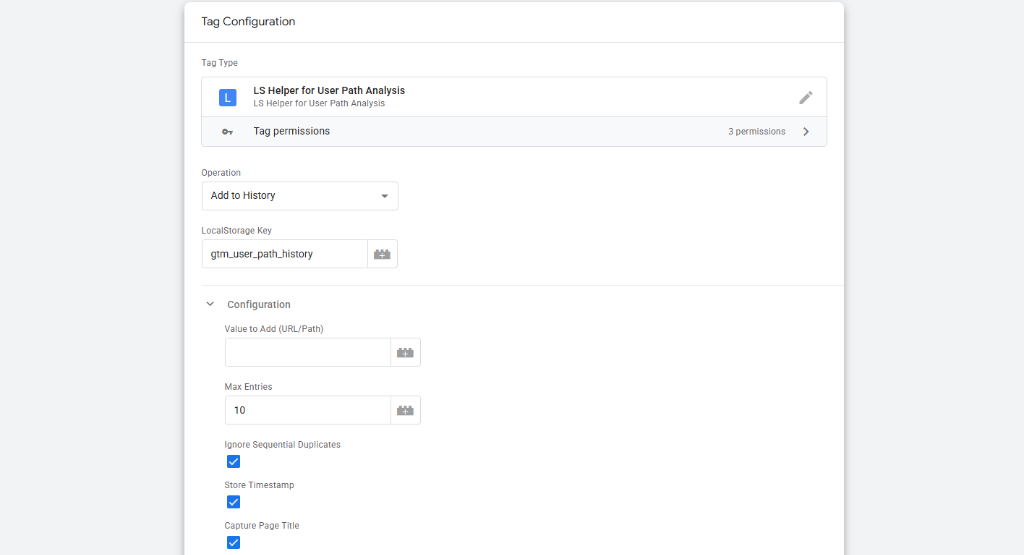
GTM Template & Configuration Screenshots:
Verified Sandbox Environment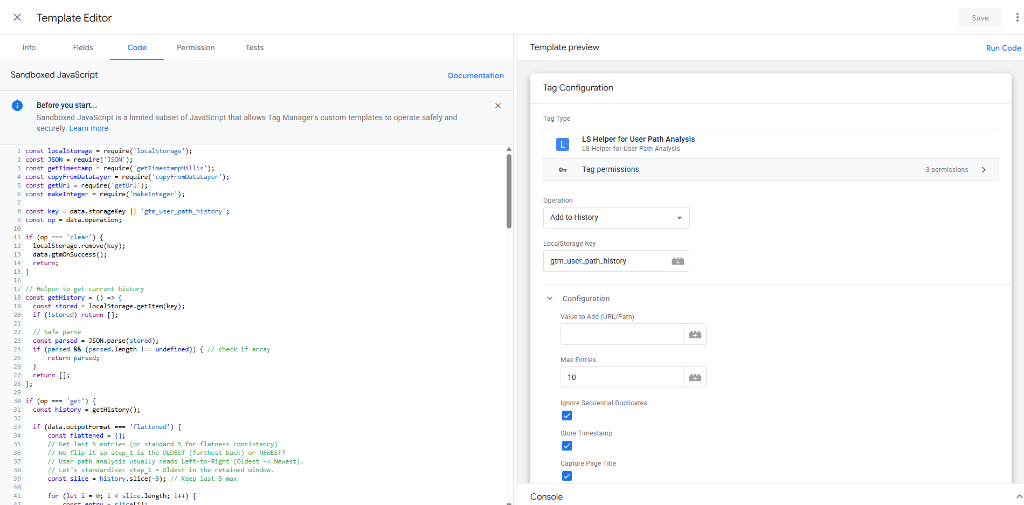
The Pre-Conversion Journey Visibility Gap
Standard web analytics platforms aggregate user traffic into broad channel metrics, but growth teams, sales executives, and conversion rate optimization (CRO) engineers frequently need immediate visibility into the exact 5-page browsing journey that led to a qualified lead or high-ticket purchase. When a lead submits a contact form, knowing they visited /pricing, /case-studies/enterprise, and /security-whitepaper immediately before converting allows sales teams to personalize outreach and enables data teams to evaluate bottom-of-funnel content velocity.
- Captures the exact sequential page journey prior to lead form completion or transaction
- Eliminates duplicate page reload noise with smart sequential duplicate suppression
- Computes precise dwell time (milliseconds on page) between navigation steps
- Outputs clean flattened keys (path_step_1...5) directly mapped to GA4 Custom Dimensions or CRM hidden fields
Execution Pipeline & Dual-Mode Architecture
The template operates in dual modes: as an asynchronous Tag firing on Page Views to record history into LocalStorage, and as a synchronous Variable firing on Conversion Events to read and flatten the stored journey.
Field Schema & Parameter Specification
Configuration parameters are structured to allow flexible storage keys, configurable FIFO buffer limits, and selective metadata capture.
| Field ID | Field Type | Required | Description | Default / Example Value |
|---|---|---|---|---|
| operation | Select Dropdown | Yes | Operation mode (Add to History, Get History, Clear History) | Add to History |
| storageKey | Text Input | Yes | LocalStorage storage key name | gtm_user_path_history |
| valueToAdd | Text Input | No | Custom URL or page path (defaults to {{Click URL}} or current URL) | {{Page Path}} |
| maxEntries | Text Input (Integer) | Yes | Maximum number of historical steps to retain in FIFO buffer | 10 |
| ignoreDuplicates | Checkbox | Yes | Suppresses duplicate consecutive entries caused by page reloads | true |
| storeTimestamp | Checkbox | No | Attaches epoch millisecond timestamp to each navigation step | true |
| captureTitle | Checkbox | No | Captures page title from DataLayer | true |
| outputFormat | Select Dropdown | Yes | Output structure for Get History (Standard Array vs Flattened Object) | Flattened Object (step_1, step_2...) |
Data Structure & Payload Serialization
History is maintained as a compact JSON-serialized array in LocalStorage. When retrieved in flattened mode, the template dynamically formats the last 5 steps for zero-overhead analytics forwarding.
Sandboxed Security & Storage Permission Governance
Enterprise security compliance is maintained by strictly limiting permissions within the GTM sandbox compiler.
- access_local_storage: Granted read/write access strictly to the configured storage key (gtm_user_path_history)
- Zero access to document.cookie, unauthorized LocalStorage keys, or session tokens
- Zero DOM scraping or unvetted external HTTP beaconing
- Safe JSON parsing with error isolation preventing script failures
Production Setup & Tag Pairing SOP
To implement in Google Tag Manager: 1) Create Tag 1 of type "LS Helper" set to "Add to History" triggered on All Pages. 2) Create a GTM Custom Variable of type "LS Helper" set to "Get History" with Output Format = "Flattened Object". 3) Attach the variable keys (e.g. {{LS Path - Step 1}}, {{LS Path - Step 2}}) as Event Parameters on your GA4 generate_lead / purchase tag.
- Recorder Tag: Type = LS Helper, Operation = Add to History, Trigger = All Page Views
- History Variable: Type = LS Helper, Operation = Get History, Format = Flattened Object
- GA4 Tag Mapping: Map path_step_1 through path_step_5 as user or event scoped custom dimensions
- Post-Conversion Reset: Optionally trigger Operation = Clear History upon successful transaction