Self-Hosted Server-Side GTM Gateway on Coolify: path.dlayer.tech
A cost-effective, self-managed server-side tracking infrastructure on Coolify providing full ownership over telemetry routing, data hygiene, and first-party cookies.
Core Code Architecture:
Coolify Docker Compose Specification (Tagging & Preview Servers) version: '3.8'
services:
tagging-server:
image: gcr.io/cloud-tagging-10302018/gtm-cloud-image:stable
container_name: sgtm-tagging-server
restart: always
environment:
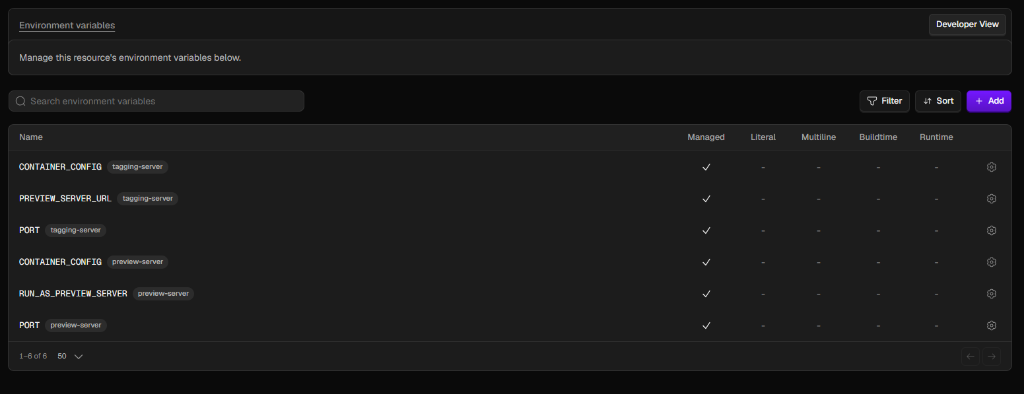
- CONTAINER_CONFIG=${CONTAINER_CONFIG} # GTM-M3MVQHRR base64 string
- PREVIEW_SERVER_URL=https://debug.dlayer.tech
- PORT=8080
ports:
- "8080:8080"
networks:
- coolify
preview-server:
image: gcr.io/cloud-tagging-10302018/gtm-cloud-image:stable
container_name: sgtm-preview-server
restart: always
environment:
- CONTAINER_CONFIG=${CONTAINER_CONFIG}
- RUN_AS_PREVIEW_SERVER=true
- PORT=8080
ports:
- "8081:8080"
networks:
- coolify
networks:
coolify:
external: true
GTM Template & Configuration Screenshots:
Verified Sandbox Environment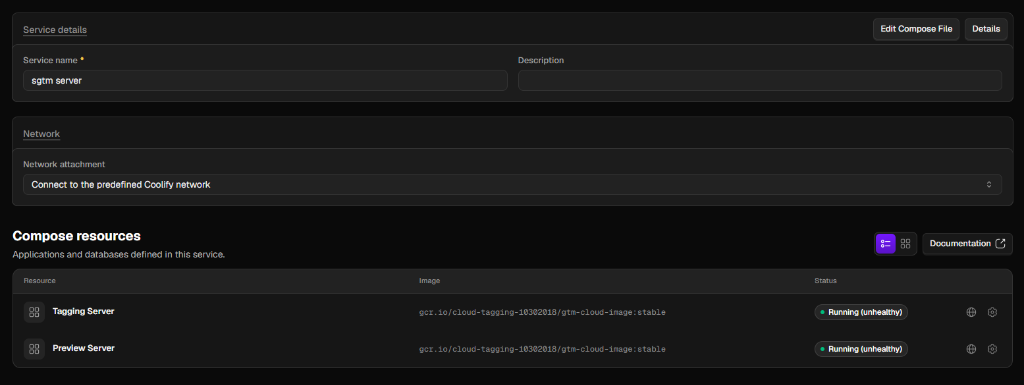
Dual-Container Architecture on Coolify
Server-Side GTM requires distinct environments for processing high-volume live production hits versus debugging interactive preview sessions. I engineered a decoupled Docker Compose architecture within Coolify:
- Tagging Server (path.dlayer.tech): Optimized for high concurrency, receiving live tracking hits from client browsers and forwarding to analytics/ad platforms.
- Preview Server (debug.dlayer.tech): Configured with RUN_AS_PREVIEW_SERVER=true to handle real-time GTM Preview Mode debugging without degrading production throughput.
- Unified Docker Network: Both containers share the internal Coolify bridge network for seamless communication and zero public port exposure.
First-Party Domain & SSL Termination
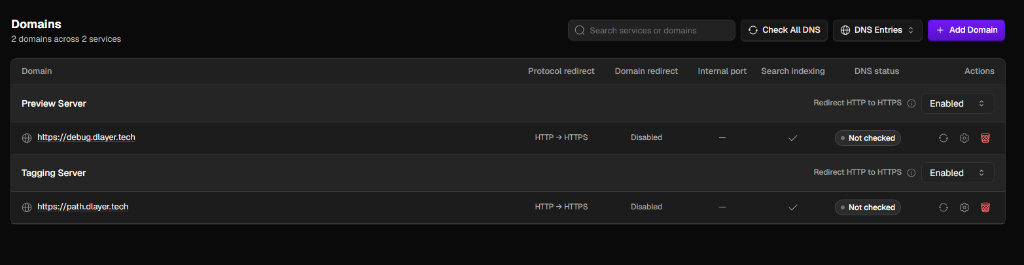
To establish genuine first-party cookie context and bypass third-party browser restrictions, custom subdomains were mapped through Coolify with automated Traefik reverse proxy routing and Let's Encrypt SSL certificates.
| Service Name | Public Endpoint | Role | SSL / HTTP Redirect |
|---|---|---|---|
| Tagging Server | https://path.dlayer.tech | Production Event Ingestion & CAPI Dispatch | HTTP -> HTTPS Enabled (Auto SSL) |
| Preview Server | https://debug.dlayer.tech | Interactive GTM Preview Mode Debugging | HTTP -> HTTPS Enabled (Auto SSL) |
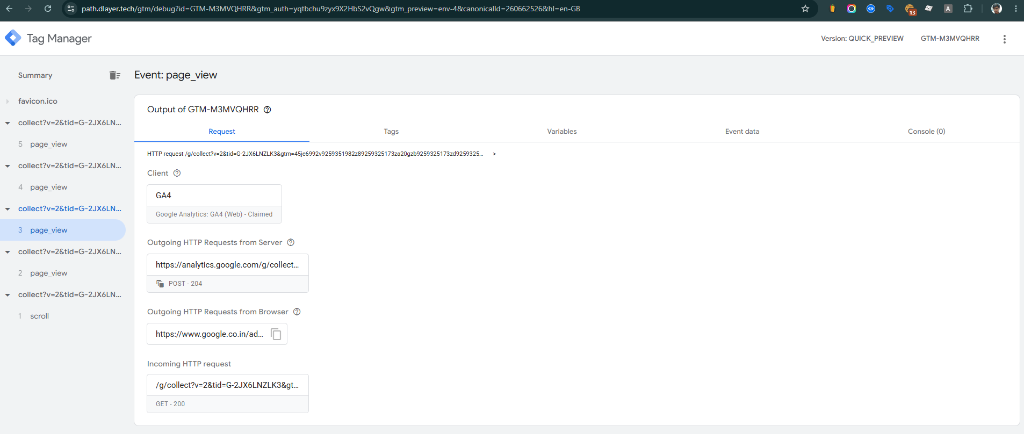
Live Telemetry Verification in Server GTM
The deployment was validated using Server GTM Container GTM-M3MVQHRR. As shown in the live preview debugger, incoming client hits (/g/collect) are claimed by the GA4 Client, enriched with server-side metadata, and dispatched upstream (HTTP 204) to Google Analytics endpoints in sub-50ms latency.
Cost & Operational Advantages over SaaS Vendors
Operating a self-hosted gateway on Coolify eliminates arbitrary vendor tier limits and ensures complete data governance.
| Dimension | Coolify Self-Hosted sGTM | Commercial SaaS Hosting |
|---|---|---|
| Monthly Cost | $5–$15 / month (fixed VPS compute) | $100–$350+ / month (tiered by event volume) |
| Event Volume Limits | Unlimited (governed only by server RAM/CPU) | Hard caps or expensive overage charges |
| Data Privacy & GDPR | 100% self-hosted on your own infrastructure | Data transits 3rd-party vendor infrastructure |
| Maintenance Overhead | Automated restarts & 1-click Docker upgrades via Coolify | Managed by vendor |