UTM & URL Shortener Builder: Google Sheets Add-On
A production Google Sheets Add-On and Apps Script system for high-velocity campaign tagging, dynamic ad macro preservation, and multi-tier shortened link generation.
Interactive In-Browser Workspace Simulator:
Client-Side Pure React (0ms Latency)Test drive the Google Apps Script engine and dark-mode sidebar directly in your browser.
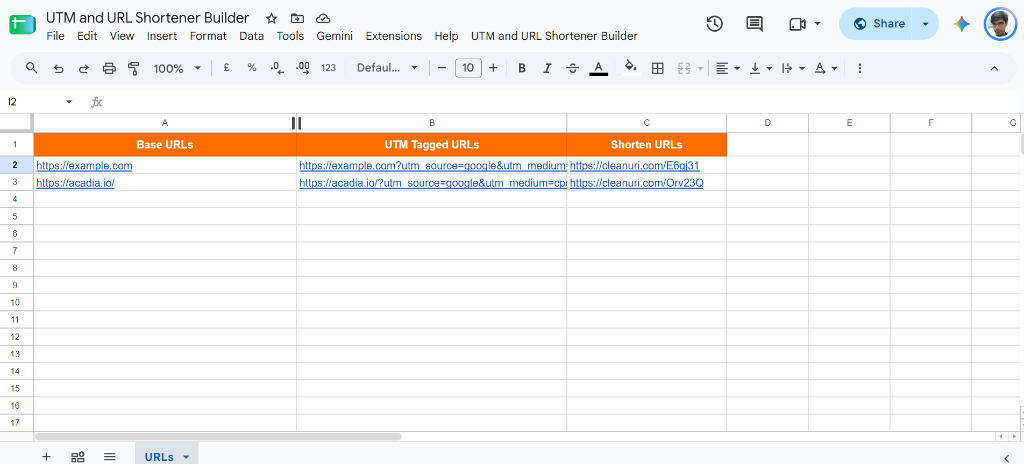
| # | A: Base URLs | B: UTM Tagged URLs | C: Shorten URLs |
|---|---|---|---|
| 2 | https://example.com?utm_source=google&utm_medium=cpc&utm_campaign=q4_launch | ||
| 3 | https://acadia.io/?utm_source=google&utm_medium=cpc&utm_campaign=q4_launch | ||
| 4 | — waiting for run — | — | |
| 5 | — waiting for run — | — |
UTM URL Builder
Google Apps Script Sidebar (HtmlService)Core Code Architecture:
Google Apps Script Chunked Processor & Caching Engine // Core Chunked Processing & Multi-Shortener Fallback (Code.gs)
const CHUNK_SIZE = 50;
const MAX_EXECUTION_TIME_MS = 4 * 60 * 1000; // 4 minutes safety limit
function generateUrlsChunked(options, startRow) {
const startTime = Date.now();
const { source, medium, campaign, term, content, mode } = options;
const sheet = SpreadsheetApp.getActiveSpreadsheet().getActiveSheet();
const rangeInfo = options.rangeInfo;
const lastRow = rangeInfo.endRow;
if (startRow > lastRow) {
return { status: 'success', message: 'Generation complete!' };
}
let endRow = Math.min(startRow + CHUNK_SIZE - 1, lastRow);
const numRows = endRow - startRow + 1;
const baseVals = sheet.getRange(startRow, rangeInfo.startCol, numRows, 1).getValues();
const utmUrls = [];
const shortUrls = [];
const cache = CacheService.getScriptCache();
for (let i = 0; i < baseVals.length; i++) {
const raw = (baseVals[i][0] || '').toString().trim();
if (!raw || !isValidUrl(raw)) {
utmUrls.push(['']); shortUrls.push(['']); continue;
}
let utm = raw;
let params = [];
if (source) params.push('utm_source=' + encodeURIComponent(source));
if (medium) params.push('utm_medium=' + encodeURIComponent(medium));
if (campaign) params.push('utm_campaign=' + encodeURIComponent(campaign));
if (term) params.push('utm_term=' + encodeURIComponent(term));
if (content) params.push('utm_content=' + encodeURIComponent(content));
if (params.length > 0) {
utm += (utm.indexOf('?') !== -1 ? '&' : '?') + params.join('&');
}
// Restore raw curly braces for Google Ads ValueTrack & Meta dynamic macros
utm = utm.replace(/%7B/gi, '{').replace(/%7D/gi, '}');
if (mode === 'both' || mode === 'utm') utmUrls.push([utm]);
if (mode === 'both' || mode === 'short') {
let short = tryCleanURI(utm) || tryUlvis(utm) || tryManyApis(utm) || tryIsGd(utm);
shortUrls.push([short || 'SHORT_ERR']);
}
}
// Write batch results to spreadsheet columns
if (mode === 'both') {
sheet.getRange(startRow, rangeInfo.startCol + 1, utmUrls.length, 1).setValues(utmUrls);
sheet.getRange(startRow, rangeInfo.startCol + 2, shortUrls.length, 1).setValues(shortUrls);
}
return endRow >= lastRow
? { status: 'success', message: 'Generation complete!' }
: { status: 'partial', nextRow: endRow + 1, currentRow: endRow, options };
}
GTM Template & Configuration Screenshots:
Verified Sandbox Environment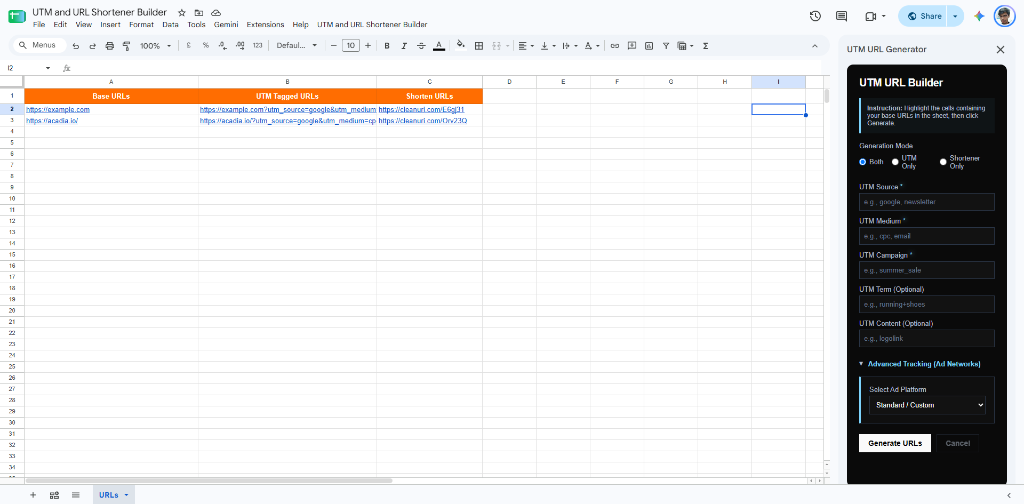
Overview & The Need for Spreadsheet-Native Tagging Automation
Digital marketing agencies and growth teams manage hundreds of campaign links across seasonal launches, influencer rosters, and multi-platform media plans. Standard web-based UTM builders are inefficient for bulk workflows, while complex Google Sheets spreadsheet formulas frequently break on special characters, fail to preserve Google Ads ValueTrack braces {campaignid} or Meta dynamic tokens {{campaign.id}}, and lack URL shortener integration. This Add-on provides an integrated, resilient solution directly within Google Sheets.
- Direct spreadsheet sidebar UI eliminating manual copy-pasting between external tools
- Support for both standard UTM parameters and platform-specific dynamic ad network macros
- Automated generation of decorated UTM URLs and shortened links in adjacent columns
- Preserves existing URL query parameters and prevents duplicate question mark delimiters
Chunked Batch Processing & Apps Script Timeout Resilience
Google Apps Script enforces a strict 6-minute maximum execution timeout per script invocation. Generating shortened URLs requires synchronous external HTTP requests, which can easily time out on sheets containing hundreds of rows. I engineered a chunked batching architecture:
- 50-Row Chunking: Splits the active spreadsheet selection into deterministic 50-row chunks
- Asynchronous Recursive Handshake: The client-side sidebar (processChunk) initiates the execution, receives partial progress, updates the progress bar, and recursively requests the next chunk
- Execution Safety Timer: Code.gs monitors Date.now() - startTime and flushes processed rows to the sheet before hitting the 4-minute safety threshold
- State Persistence: Passes range coordinates and offset markers back to the client UI to ensure zero data loss during network hiccups
Multi-Tier Resilient URL Shortener Pipeline with MD5 CacheService
To prevent API rate-limiting and external service downtime from failing the entire batch, I developed a 4-tier cascading shortener pipeline with ephemeral caching:
| Tier | Service Endpoint | Method | Fallback Trigger |
|---|---|---|---|
| Cache Layer | Google CacheService (Script Cache) | MD5 URL Key Hash | Instant return on cache hit (6-hour TTL) |
| Tier 1 Primary | CleanURI (cleanuri.com/api/v1/shorten) | POST JSON | Fails on HTTP != 200 or timeout |
| Tier 2 Fallback | Ulvis (ulvis.net/api/v1/shorten) | POST JSON | Activated if Tier 1 returns null (500ms backoff) |
| Tier 3 Fallback | ManyAPIs (manyapis.com/api/shorten-url) | POST JSON | Activated if Tier 2 returns null (500ms backoff) |
| Tier 4 Fallback | Is.gd (is.gd/create.php?format=simple) | GET Text | Final emergency fallback with error string trapping |
Google Ads ValueTrack & Meta Dynamic Macro Support
Standard URL parameter encoders (encodeURIComponent) transform curly brackets { and } into %7B and %7D. When uploaded into Google Ads or Meta Ads, encoded braces break the ad platform's dynamic token replacement engine (e.g. {campaignid}, {adgroupid}, {{ad.id}}).
- Pre-configured presets for Google Ads ValueTrack (campaignid, adgroupid, creative, keyword, matchtype, placement, device)
- Pre-configured presets for Meta Ads dynamic macros (campaign_id, campaign_name, adset_id, adset_name, ad_id, ad_name, site_source_name, placement)
- Regex Post-Processing: utm.replace(/%7B/gi, "{").replace(/%7D/gi, "}") restores raw curly braces, guaranteeing 100% ad platform compatibility
Sleek Dark Mode UI Architecture (Sidebar.html)
The sidebar is engineered with custom CSS adhering to a high-contrast dark aesthetic with smooth transitions and responsive controls:
- Generation Mode Selector: Radio buttons allowing users to choose Both (UTM + Short), UTM Only, or Shortener Only
- Interactive Ad Platform Dropdown: Expands Google Ads or Meta Ads parameter grids on demand
- Animated Progress Indicator: Displays real-time row percentage, current row offset, and dynamic status messages
- Cancel / Pause Support: Empowers users to gracefully halt generation mid-chunk without corrupting sheet data
Google Workspace Add-on Manifest & Security Permissions
The Add-on is scoped with minimal OAuth permissions following Google Workspace security guidelines (@OnlyCurrentDoc, spreadsheets.currentonly, script.container.ui, script.external_request), ensuring full enterprise security compliance.
| OAuth Scope | Type | Justification |
|---|---|---|
| spreadsheets.currentonly | Spreadsheet Access | Read and write base URLs and generated UTM links in the active sheet only |
| script.container.ui | UI Rendering | Display the custom menu and render the HTML5 sidebar dialog |
| script.external_request | External Network | Dispatch HTTP POST requests to URL shortener APIs |