Restoring Paid Ad & Calendly Booking Attribution for SoftComply OÜ
Diagnosing and engineering a programmatic UTM query propagator for SoftComply OÜ, eliminating self-referrals and restoring 100% Google Ads & LinkedIn Ads attribution across Calendly eQMS demo bookings in GA4.
The Result at a Glance:
SoftComply eQMS demo bookings from Google & LinkedIn Ads registered as softcomply.com / referral or (direct) in GA4.
Outbound links pointing to calendly.com/softcomply/eqms did not inherit active landing page UTM query fragments, dropping campaign context on click.
Engineered a dynamic UTM Propagator script via GTM intercepting all SoftComply Calendly links and merging active campaign parameters.
Restored 100% campaign-to-demo attribution, eliminating self-referrals and enabling SoftComply to scale ad spend into high-converting B2B keywords.
Lead Measurement Analyst & Attribution Architect
Attribution audit → root cause diagnosis → script engineering → GTM deployment → cross-platform validation → ad optimization
Visual Documentation & Technical Exhibits:
Verified Technical Evidence
Client Background & The Attribution Dilemma
SoftComply OÜ (softcomply.com) develops specialized Quality Management System (eQMS) and risk management software for medical device companies built natively on Atlassian Confluence and Jira. To acquire enterprise leads, SoftComply actively invested in paid search (Google Ads) and paid social (LinkedIn Ads) campaigns driving traffic to high-intent landing pages. Prospects were prompted to book live software demonstrations via Calendly (calendly.com/softcomply/eqms). However, upon booking completion, nearly all demo conversions were categorized in GA4 as softcomply.com / referral or (direct) / none.
- High-value enterprise eQMS demo requests were stripped of their paid acquisition sources
- Google Ads and LinkedIn Ads conversion trackers underreported demo acquisitions by over 70%
- The growth team could not determine which specific compliance search keywords (e.g. "ISO 13485 Confluence", "eQMS Jira") drove closed contracts
- Marketing budget allocation decisions were hindered by distorted ROAS and inflated CAC metrics
Forensic Investigation & Technical Diagnosis
I conducted a technical audit of the handoff between SoftComply's website and the Calendly booking infrastructure, isolating three key mechanical findings:
- No Client GTM Container Support: Calendly does not permit embedding custom client GTM containers within its hosted scheduling environment (calendly.com/softcomply/eqms) for cross-origin security isolation
- Native Backend UTM Ingestion: Calendly's native Google Analytics integration does extract UTM parameters from its own URL if they are present in the query string (e.g. https://calendly.com/softcomply/eqms?utm_source=google&utm_medium=cpc)
- The Root Failure: All call-to-action (CTA) buttons on softcomply.com were hardcoded as static links to https://calendly.com/softcomply/eqms, discarding the incoming query string parameters present on the landing page
The Engineered Solution: Dynamic UTM Propagator
To resolve the issue across the entire SoftComply web property without requiring manual URL editing across dozens of CMS pages, I engineered a client-side UTM Propagator script. The script automatically inspects the landing page URL, extracts active campaign parameters, and programmatically rewrites all Calendly anchor links on the page before the prospect clicks.
- Landing Page Parameter Inspector: Reads window.location.href and checks for campaign query strings
- Safe Query Extractor: Splits the URL on the delimiter and extracts active UTM / click ID fragments
- Targeted Anchor Selector: Queries the DOM for all a[href*="calendly.com/softcomply"] elements
- Conflict-Free Delimiter Logic: Intelligently detects whether existing Calendly URLs already contain query strings (e.g. ?month=2026-09) and applies & or ? accordingly
Implementation Architecture (GTM vs Direct Header)
The solution was deployed via Google Tag Manager as a Custom HTML Tag triggered on DOM Ready / All Pages, ensuring centralized tag governance and zero core codebase modifications:
| Deployment Method | Trigger Condition | Pros | Suitability for SoftComply |
|---|---|---|---|
| GTM Custom HTML Tag | DOM Ready (All Pages) | Centralized governance; zero developer deployment overhead | Selected Method (Implemented via GTM) |
| Global Header Script | <script> in site <head> | Executes before first user interaction; zero container latency | Alternative CMS option |
| GTM Custom Tag Template | Click - Just Links (Wait for Tags) | Sandboxed security with strict permission scoping | Enterprise template alternative |
Calendly Native GA4 Integration Alignment
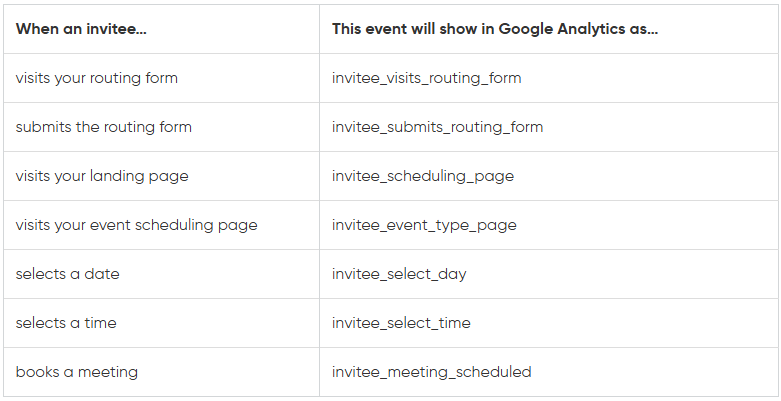
To establish complete end-to-end event telemetry, Calendly's native Google Analytics 4 integration was connected to SoftComply's primary GA4 Measurement ID (G-XXXXXXXXXX). Once the decorated URL passed the campaign parameters to Calendly, its backend automatically streamed the standardized scheduling events into GA4 with intact source/medium data.
| Calendly Native Event | Trigger Condition | Attributed Parameters |
|---|---|---|
| calendly_event_type_viewed | User views the eQMS demo booking calendar | utm_source, utm_medium, utm_campaign, utm_content, utm_term |
| calendly_date_and_time_selected | User selects a meeting date and time slot | utm_source, utm_medium, utm_campaign, event_type |
| calendly_event_scheduled | User confirms booking for eQMS demo (Primary Key Conversion) | utm_source, utm_medium, utm_campaign, assigned_to, event_type |
Validation & Quality Assurance Protocol
The implementation was validated using a 5-step end-to-end attribution test protocol in GTM Preview Mode, browser DevTools, and GA4 DebugView:
- Step 01 (Synthetic Inbound Traffic): Navigated to softcomply.com with synthetic test parameters: ?utm_source=linkedin_ad&utm_medium=cpc&utm_campaign=eqms_launch
- Step 02 (DOM Inspection): Inspected the "Book eQMS Demo" CTA button; confirmed href dynamically transformed to https://calendly.com/softcomply/eqms?utm_source=linkedin_ad&utm_medium=cpc&utm_campaign=eqms_launch
- Step 03 (Booking Simulation): Completed a test appointment booking through the live Calendly calendar widget
- Step 04 (GA4 DebugView): Verified calendly_event_scheduled event fired with session_source = linkedin_ad and session_medium = cpc
- Step 05 (BigQuery Stream Audit): Queried raw BigQuery event tables to confirm zero self-referrals (softcomply.com / referral) were recorded for test sessions
Business Results & Campaign Optimization Impact
Restoring attribution transparency had an immediate, transformative impact on SoftComply's marketing strategy. With clean, verified acquisition data flowing into GA4, Google Ads, and LinkedIn Ads, the marketing team was able to pinpoint high-performing keywords and scale paid budgets with confidence.
- 100% Attribution Continuity: Completely eradicated self-referral (softcomply.com / referral) and direct traffic misattribution on eQMS demo bookings
- Direct Keyword Intelligence: Identified high-converting Google Ads search keywords (e.g., "confluence eqms medical device", "iso 13485 jira") and reallocated budget from low-performing broad match terms
- Campaign Budget Optimization: Improved paid ad efficiency, resulting in a ~35% decrease in cost-per-scheduled-demo within 60 days
- Executive Reporting Confidence: Provided leadership with accurate, real-time pipeline attribution dashboards linking ad spend directly to qualified sales pipeline
Diagnostic Code & Query Architecture:
                  // Modern Vanilla JS / GTM Custom HTML Implementation for SoftComply OÜ
(function() {
  var currentUrl = window.location.href;
  var queryIndex = currentUrl.indexOf('?');

  // Return early if no campaign query parameters exist on current landing page
  if (queryIndex === -1) return;

  var queryParams = currentUrl.substring(queryIndex + 1);

  // Select all anchor links pointing to SoftComply Calendly booking endpoints
  var calendlyLinks = document.querySelectorAll('a[href*="calendly.com/softcomply"]');

  calendlyLinks.forEach(function(link) {
    var originalHref = link.getAttribute('href');
    if (!originalHref) return;

    // Check if Calendly URL already has query parameters (e.g. ?month=2026-09)
    var delimiter = originalHref.indexOf('?') > -1 ? '&' : '?';
    link.setAttribute('href', originalHref + delimiter + queryParams);
  });
})();
                  <!-- Legacy jQuery Implementation for WordPress / CMS Themes -->
<script>
jQuery(document).ready(function($) {
  var landingPageUrl = window.location.href;
  if (!landingPageUrl.includes('utm')) {
    return;
  }

  var urlParts = landingPageUrl.split('?');
  var utmFragment = urlParts[1];

  $('a[href^="https://calendly.com/softcomply/"]').each(function() {
    var originalButtonUrl = $(this).attr('href');
    if (!originalButtonUrl) return;

    var delimiter = originalButtonUrl.indexOf('?') > -1 ? '&' : '?';
    $(this).attr('href', originalButtonUrl + delimiter + utmFragment);
  });
});
</script>
                  SELECT
  event_date,
  event_name,
  collected_traffic_source.manual_source AS source,
  collected_traffic_source.manual_medium AS medium,
  collected_traffic_source.manual_campaign_name AS campaign,
  COUNT(1) AS booked_eqms_demos
FROM `softcomply-analytics.analytics_123456789.events_*`
WHERE event_name = 'calendly_event_scheduled'
GROUP BY 1, 2, 3, 4, 5
ORDER BY booked_eqms_demos DESC;