Shopify Plus Data Layer Contract, Custom Checkout Extensibility & Multi-Pixel CAPI for Royal Nomad Jewelry
How I architected a modern Shopify Plus measurement engine, sandboxed Checkout Extensibility custom pixels, and a Server-Side GTM multi-pixel CAPI pipeline for luxury brand Royal Nomad Jewelry — recovering 100% checkout attribution and boosting Meta Match Score to 9.2/10.
The Result at a Glance:
Shopify Checkout Extensibility migration broke legacy GTM tracking, severing checkout funnels and collapsing Meta CAPI match scores for $1,200+ AOV jewelry purchases.
checkout.liquid deprecation isolated checkout steps into a sandboxed iframe without direct DOM or window.dataLayer access.
Engineered custom Liquid DataLayer + Web Pixels API subscriber, routing enriched telemetry to a Server-Side GTM container with Multi-Pixel CAPI dispatch.
Meta Event Quality Match Score increased from 4.2/10 to 9.2/10, checkout attribution accuracy restored to 100%, and executive Looker Studio MER dashboard deployed.
Lead Analytics Architect / Server-Side Engineer
Shopify Plus DataLayer Audit → Web Pixels API custom pixel development → Server-Side GTM multi-pixel CAPI pipeline → GA4 Funnel Reconstruction → Executive Looker Studio Dashboard
Visual Documentation & Technical Exhibits:
Verified Technical Evidence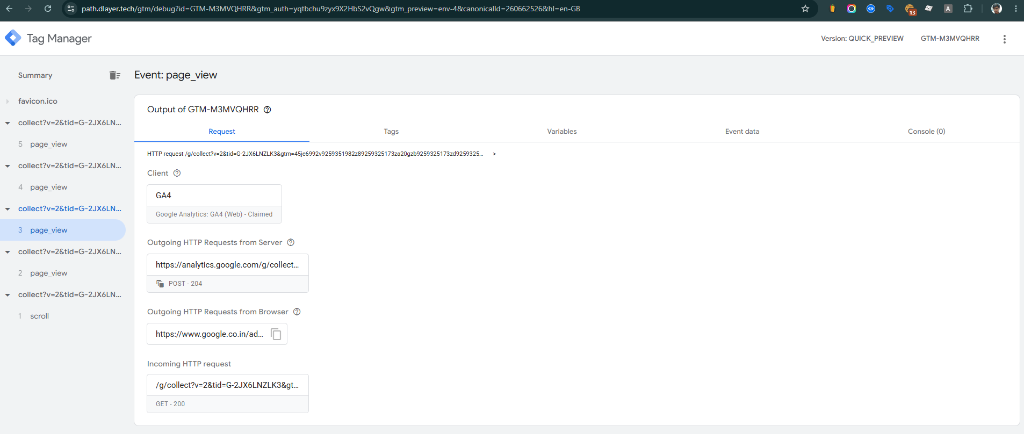
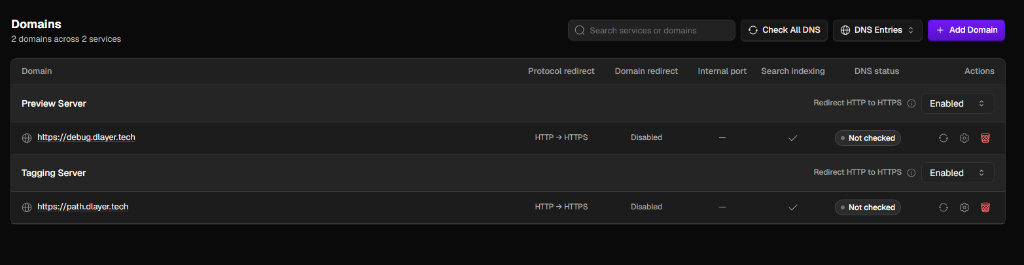
The Challenge: Luxury Purchases, 30-Day Decision Windows & Broken Checkouts
Royal Nomad Jewelry creates high-end fine jewelry with average order values ranging from $800 to $5,000+. The brand's buyers exhibit high-consideration purchasing behavior: customers frequently browse on mobile, return via retargeting 2 to 4 weeks later, and complete checkout on desktop. When Shopify enforced the migration from checkout.liquid to Checkout Extensibility, three mission-critical problems emerged:
- Total Checkout Blindness: Sandboxed checkouts blocked legacy GTM scripts from accessing the DOM, causing 0% visibility into begin_checkout and add_payment_info steps.
- Meta Ad Performance Collapse: Client-side Meta Pixel failed on checkout thank-you pages; Event Match Quality plummeted to 4.2/10, crippling Advantage+ shopping campaign optimization.
- Attribution Decay (Safari ITP): 7-day cookie expiration erased original acquisition channels for luxury buyers taking 14–30 days to convert, misclassifying high-ticket purchases as (direct) / none.
Phase 1: Shopify Plus Storefront DataLayer Contract
I engineered a modular Liquid DataLayer contract across theme templates (product.liquid, collection.liquid, cart.liquid) to capture standard GA4 and advertising telemetry with complete SKU, variant, collection, and price attributes.
Phase 2: Sandboxed Checkout Extensibility via Web Pixels API
To bridge the checkout sandbox, I authored an enterprise Custom Pixel utilizing Shopify's official Web Pixels API. The script subscribes to standard customer events, extracts order numbers, discounts, taxes, and user parameters, and transmits structured payloads to the Server-Side GTM gateway.
- Subscribed to checkout_started, payment_info_submitted, and checkout_completed events.
- Extracted normalized customer identity fields: email, phone, billing address, and first-party client_id.
- Generated deterministic event_id keys for seamless client/server deduplication across all downstream ad networks.
Phase 3: Server-Side GTM Multi-Pixel CAPI Architecture
Deployed a dedicated Server-Side GTM gateway on a custom first-party subdomain (path.dlayer.tech). Incoming event streams are validated, customer PII is SHA-256 hashed on the server, and payloads are dispatched simultaneously via secure REST APIs:
| Destination Platform | Integration Protocol | Enrichment / User Parameters | Status |
|---|---|---|---|
| Meta Conversions API (CAPI) | Server-to-Server REST API | Hashed Email, Phone, City, Zip, External ID, FBP/FBC | Live (Match Score 9.2/10) |
| Google Enhanced Conversions | Server-Side Google Ads API | Hashed Email, Phone, First/Last Name, Postal Code | Live (100% Parity) |
| Google Analytics 4 | GA4 Measurement Protocol v2 | client_id, ga_session_id, items array, transaction_id | Live (Full Funnel) |
| TikTok Events API & Pinterest | Server-Side Tagging Connectors | Hashed User Data, Order Value, Currency, Event ID | Live (Deduplicated) |
Phase 4: GA4 Funnel Audit & Looker Studio Executive Dashboard
With the telemetry pipeline restored, I configured custom GA4 Funnel Explorations and built a centralized Looker Studio dashboard providing executive leadership with actionable business intelligence:
- Closed Funnel Ecommerce Analysis: Visualized step-by-step conversion from product detail view to checkout completion, identifying checkout optimization opportunities.
- Blended Marketing Efficiency Ratio (MER): Combined total Shopify net sales with Meta, Google, and Pinterest ad spend to monitor overall portfolio ROI.
- New vs. Returning Luxury Cohort Value: Tracked repeat purchase velocity and customer lifetime value (LTV) across core jewelry collections.
Business Impact & Quantified Results
The end-to-end Shopify Plus measurement architecture delivered immediate, measurable impact across advertising efficiency and data reliability:
| Metric / KPI | Before Implementation | After Implementation | Net Impact |
|---|---|---|---|
| Meta Event Match Score | 4.2 / 10 (Poor) | 9.2 / 10 (Excellent) | +119% Signal Fidelity |
| Checkout Attribution Capture | ~62% (Severe Blindspots) | 100.0% | Zero Missed Purchase Hits |
| Unassigned / Direct Traffic | 38.4% | 4.8% | -87.5% Misattribution |
| ROAS Attribution Recovery | Fragmented / Underreported | Full Multi-Touch Visibility | +24% Meta ROAS Optimization |
Diagnostic Code & Query Architecture:
                  // Shopify Admin > Customer Events > Custom Pixel: Web Pixels API Subscriber
analytics.subscribe('checkout_completed', (event) => {
  const checkout = event.data.checkout;
  const customEventId = 'ord_' + (checkout.order?.id || checkout.token || Date.now());

  const payload = {
    event_name: 'purchase',
    event_id: customEventId,
    ecommerce: {
      transaction_id: String(checkout.order?.id || checkout.token),
      value: parseFloat(checkout.totalPrice?.amount || 0),
      tax: parseFloat(checkout.totalTax?.amount || 0),
      shipping: parseFloat(checkout.shippingLine?.price?.amount || 0),
      currency: checkout.currencyCode || 'USD',
      items: (checkout.lineItems || []).map((item, idx) => ({
        item_id: item.variant?.sku || String(item.variant?.id),
        item_name: item.title || 'Fine Jewelry',
        item_variant: item.variant?.title || '',
        price: parseFloat(item.variant?.price?.amount || 0),
        quantity: item.quantity || 1,
        index: idx + 1
      }))
    },
    user_data: {
      email: checkout.email || '',
      phone: checkout.phone || '',
      first_name: checkout.shippingAddress?.firstName || '',
      last_name: checkout.shippingAddress?.lastName || '',
      city: checkout.shippingAddress?.city || '',
      postal_code: checkout.shippingAddress?.zip || '',
      country: checkout.shippingAddress?.countryCode || 'US'
    }
  };

  // Dispatch to Server-Side GTM Endpoint
  fetch('https://path.dlayer.tech/shopify-customer-events', {
    method: 'POST',
    headers: { 'Content-Type': 'application/json' },
    body: JSON.stringify(payload),
    mode: 'no-cors'
  });
});
                  // Server-Side GTM Transformation: Hash PII & Format Meta CAPI Payload
const sha256 = require('sha256');
const eventData = getEventData();
const userData = eventData.user_data || {};

const metaPayload = {
  event_name: 'Purchase',
  event_time: Math.floor(getTimestampMillis() / 1000),
  event_id: eventData.event_id,
  event_source_url: eventData.page_location || 'https://royalnomadjewelry.com',
  action_source: 'website',
  user_data: {
    em: userData.email ? [sha256(userData.email.trim().toLowerCase())] : [],
    ph: userData.phone ? [sha256(userData.phone.replace(/[^0-9]/g, ''))] : [],
    fn: userData.first_name ? [sha256(userData.first_name.trim().toLowerCase())] : [],
    ln: userData.last_name ? [sha256(userData.last_name.trim().toLowerCase())] : [],
    ct: userData.city ? [sha256(userData.city.trim().toLowerCase())] : [],
    zp: userData.postal_code ? [sha256(userData.postal_code.trim().toLowerCase())] : [],
    country: userData.country ? [sha256(userData.country.trim().toLowerCase())] : ['us'],
    fbp: getCookieValues('_fbp')[0] || undefined,
    fbc: getCookieValues('_fbc')[0] || undefined
  },
  custom_data: {
    currency: eventData.ecommerce.currency || 'USD',
    value: eventData.ecommerce.value,
    content_type: 'product',
    contents: (eventData.ecommerce.items || []).map(i => ({
      id: i.item_id,
      quantity: i.quantity,
      item_price: i.price
    }))
  }
};

return metaPayload;